Prevent opportunistic laptop theft
on college campuses
A lightweight, printable kit for students, staff, and campus safety
& security teams.
Key facts & next steps for campus administrators in 2026
Laptop anti-theft guidance hasn’t kept pace with the platform shift:
for years it assumed you needed third-party “LoJack-style” software
and that your best option was tracking after the fact. Today, both
macOS and Windows already include
OS-native locate and lock
1 , and on Apple devices the
Find My network enables offline-capable location
reporting that makes tracking far more effective than older vendor
approaches . Find My also supports remote lock and erase for Macs
(these actions apply when the device is online).
2
Best practice is OS-native recovery controls plus
prevention-first tooling that helps stop a theft
before it succeeds. Use tracking to support reporting and evidence —
not self-recovery and treat “don’t broaden the
attack surface” as part of responsible cybersecurity and data
protection
3 .
What’s inside
A small kit you can use today. A neutral, campus-friendly resource
you can link to without feeling like you’re endorsing a vendor.
1) 1-page checklist (PDF)
A one-page, print-friendly checklist you can share, print and
post, or link from a campus safety page.
2) Prevention vs recovery vs response (2–3 min read)
A simple model for students and institutions to stop laptop
theft by using each layer. Tailored for non-technical users.
3) Set up tracking in 90 seconds
Quick setup steps + official links for macOS and Windows.
Prevention vs response vs recovery
The three layers (and what each one actually does)
1. Prevention (stop opportunistic laptop theft)
Designed to prevent the most common theft scenario: someone
grabs your laptop while you step away from it to grab a coffee,
visit the restroom, or find a quiet spot for a call.
Prevention is critical because most stolen laptops are never
recovered.
-
Best for: libraries, cafés, study halls, co-working spaces
-
What it changes: reduces the probability of a successful theft
in the moment
2. Response (what you do next)
The steps that reduce damage after a loss: reporting, account
security, insurance.
-
Best for: reducing downstream harm (account access, data
exposure, fraud)
3. Recovery (find, lock, protect)
Helps you locate a device, mark it as lost, and/or lock it
(capabilities vary by platform, settings, and connectivity).
-
Best for: “where is it now?” and “make it harder to reuse”
-
Examples: Apple Find My (macOS), Find my device (Windows)
Bottom line: Most people rely on a single layer.
The campus kit makes it easy to use all three—without turning this
into an IT project.
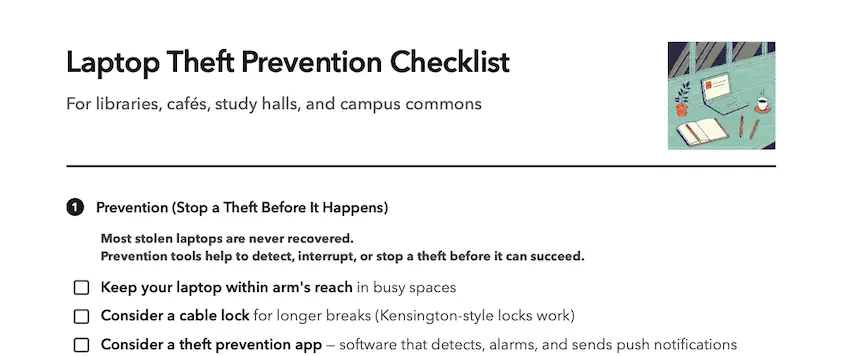
Laptop Theft Prevention Checklist
For libraries, cafés, study halls, co-working spaces, airports, and
campus commons.
What it covers (at a glance):
- Set up tracking + encryption + auto-lock + backups
- Simple habits for working in public spaces
- What to do in the first 10 minutes if it goes missing
Set up laptop tracking in 90 seconds
Tracking and recovery (macOS or Windows).
macOS (Apple Find My)
Note: These instructions are tailored for macOS 26 Tahoe. Steps
may vary slightly by version.
- Open System Settings.
- Click your name in the top left of the window.
-
Click iCloud in the main window area. Then click See All.
- Click to open Find My Mac.
-
Click to enable both Find My Mac and the Find My Network.
Official Apple instructions: Find My on Mac
Windows (Find my device)
- Open Settings.
-
Go to Privacy & security (or Update & Security on
older versions).
- Find “Find my device” and turn it on.
- Confirm you’re signed in with your Microsoft account.
Official Microsoft instructions: Find my device
Prevention tools (preventing a theft before it succeeds)
→ Recovery tools can help after a
laptop is gone, but most stolen laptops are
never recovered.
→ Prevention tools are about
detecting and interrupting a theft the moment it is
attempted.
Common prevention options:
- A physical cable lock (simple, visible prevention)
-
A laptop alarm (software that should auto-arm, make noise, and
notify the owner when a theft attempt is detected)
Physical cable locks
Physical locking devices are available for laptops, either keyed or
with combinations, such as
Kensington locks
.
Depending on your laptop model, you may need to affix the lock mount
to your laptop with screws or adhesive.
Theft prevention software
macOS
Rex for macOS
Rex is purpose-built for macOS theft prevention in public
spaces.
- Runs in the background (no constant arming/disarming)
- Built to avoid common false-alarm patterns
-
Works alongside Find My (Rex prevention + Find My recovery)
See Rex
Windows
Microsoft Windows has few prevention-first options that are
reliable without enterprise tooling; for most users a cable
lock such as a
Kensington lock
is your best prevention option.